# Control access to Sitecore page design per item
Some time ago a client needed to be able to **control access** to the page layout on a **per item basis**. They wanted some users to only be able to change the presentation details in specific parts of the content tree.
**Sitecore** currently isn’t really made to support controlling **access to page layout/presentation details** on a per item basis. The functionality is currently tied to a **policy item** in the core database and you normally assign the `sitecore/Designer` role, which gives access to this policy, to users who should be able to change the page layout. As such it’s an **all or nothing** approach. You cannot deny users the ability to change the presentation on **specific pages**.
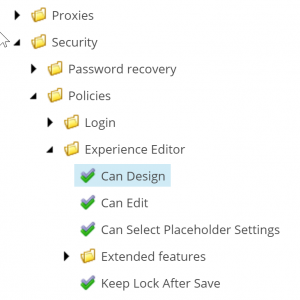
While this doesn’t make it impossible, it does make the solution a bit more “manual” and not totally future proof – but overall it works pretty well!
You can see the code on [GitHub](https://github.com/Krusen/Sitecore-DesignAccessRights), install the [NuGet package](https://www.nuget.org/packages/Krusen.Sitecore.DesignRights/) (Krusen.Siteore.DesignRights) or download the Sitecore package [from the marketplace](https://marketplace.sitecore.net/Modules/D/Design_Rights.aspx). Let me know on [GitHub](https://github.com/Krusen/Sitecore-DesignAccessRights/issues) if you have any issues or suggestions.
## Implementation
The implementation consists of a few different parts – most of them are pretty simple though. In short there are **3 parts**:
- Defining a custom access right
- Overriding the authorization provider and helpers
- Overriding relevant Content and Experience Editor buttons to respect the new access right
### Defining the custom access right
It’s quite easy to create a new custom access right. You start out by adding a config file defining the **access right** and the **implementing type**.
```xml
```
Then you just need to create a class extending `Sitecore.Security.AccessControl.AccessRight`. It does not require any special logic. All it requires is the name of the access right defined in the config.
```csharp
using System;
using Sitecore.Configuration;
using Sitecore.Data.Items;
using Sitecore.Security.AccessControl;
using Sitecore.Security.Accounts;
namespace Krusen.Sitecore.DesignRights.Security
{
public class DesignAccessRight : AccessRight
{
public const string DefaultAccessRightName = "item:customdesign";
public static string AccessRightName { get; } = Settings.GetSetting("DesignRights.AccessRightName", DefaultAccessRightName);
private static readonly Lazy _accessRight = new Lazy(() => FromName(AccessRightName));
public static AccessRight AccessRight => _accessRight.Value;
public DesignAccessRight(string name) : base(name)
{
}
public static bool IsAllowed(Item item, Account account)
{
return AuthorizationManager.IsAllowed(item, AccessRight, account);
}
public static bool IsDenied(Item item, Account account)
{
return AuthorizationManager.IsDenied(item, AccessRight, account);
}
public static AccessResult GetAccess(Item item, Account account)
{
return AuthorizationManager.GetAccess(item, account, AccessRight);
}
}
}
```
That’s it for the access right itself.
### Authorization provider and helpers
The authorization provider uses an `ItemAuthorizationHelper` to check if someone has access or not to a specific item.
For this whole thing to work we need to create our own version, extending the existing one, which denies access to the **Can Design** policy item in the core database – if our new access right is not set to **Allow** on the current context item (or inherited).
```csharp
using Sitecore;
using Sitecore.Data;
using Sitecore.Data.Items;
using Sitecore.Security.AccessControl;
using Sitecore.Security.Accounts;
namespace Krusen.Sitecore.DesignRights.Security
{
public class DesignRightsItemAuthorizationHelper : ItemAuthorizationHelper
{
private static readonly ID PolicyCanDesignID = ID.Parse("{5A524BAD-2257-4330-9CAD-A2DCB1111A66}");
protected override AccessResult GetItemAccess(Item item, Account account, AccessRight accessRight,
PropagationType propagationType)
{
var result = base.GetItemAccess(item, account, accessRight, propagationType);
// We don't want to overrule other permissions not allowing access (write access etc.)
if (result?.Permission != AccessPermission.Allow)
return result;
// Only check if the item is the "CanDesign" policy item or if context item is not null
// Context item can be null for some requests in the Content Editor
if (!ShouldCheckDesignRights(item))
return result;
var designAccessResult = DesignAccessRight.GetAccess(item, account);
if (designAccessResult.Permission != AccessPermission.Allow)
return designAccessResult;
return result;
}
private static bool ShouldCheckDesignRights(Item item)
{
return item.ID == PolicyCanDesignID && Context.Item != null;
}
}
}
```
We also need to **deny write access** to the **layout fields** accordingly by replacing the `FieldAuthorizationHelper`.
```csharp
using System.Collections.Generic;
using Sitecore;
using Sitecore.Data;
using Sitecore.Data.Fields;
using Sitecore.Security.AccessControl;
using Sitecore.Security.Accounts;
namespace Krusen.Sitecore.DesignRights.Security
{
class DesignRightsFieldAuthorizationHelper : FieldAuthorizationHelper
{
private static readonly HashSet LayoutFieldIDs = new HashSet
{
FieldIDs.LayoutField,
FieldIDs.FinalLayoutField
};
public override AccessResult GetAccess(Field field, Account account, AccessRight accessRight)
{
AccessResult result = null;
if (ShouldCheckDesignRights(field, accessRight))
result = GetLayoutFieldAccess(field, account);
return result ?? base.GetAccess(field, account, accessRight);
}
private static bool ShouldCheckDesignRights(Field field, AccessRight accessRight)
{
return accessRight == AccessRight.FieldWrite && LayoutFieldIDs.Contains(field.ID);
}
private static AccessResult GetLayoutFieldAccess(Field field, Account account)
{
var accessResult = DesignAccessRight.GetAccess(field.Item, account);
if (accessResult.Permission == AccessPermission.Allow)
return null;
return new AccessResult(AccessPermission.Deny, accessResult.Explanation); ;
}
}
}
```
Now, to actually use these new helpers we need to replace the **authorization provider**.
```csharp
using Sitecore.Buckets.Security;
using Sitecore.Security.AccessControl;
namespace Krusen.Sitecore.DesignRights.Security
{
public class DesignRightsAuthorizationProvider : BucketAuthorizationProvider
{
private ItemAuthorizationHelper _itemHelper;
private FieldAuthorizationHelper _fieldHelper;
public DesignRightsAuthorizationProvider()
{
_itemHelper = new DesignRightsItemAuthorizationHelper();
_fieldHelper = new DesignRightsFieldAuthorizationHelper();
}
protected override ItemAuthorizationHelper ItemHelper
{
get { return _itemHelper; }
set { _itemHelper = value; }
}
protected override FieldAuthorizationHelper FieldHelper
{
get { return _fieldHelper; }
set { _fieldHelper = value; }
}
}
}
```
Here we are just setting it to use our new `DesignRightsItemAuthorizationHelper` and `DesignRightsFieldAuthorizationHelper` instead of the default ones. At last we need to add another config file (or add to the previous).
```xml
```
We add our new **authorization provider** and sets the **default provider** to use that.
***NOTE**: This part needs to be after `Sitecore.Buckets.config` otherwise that file will overwrite our changes to the default provider.*
### Editor buttons
Last but not least we need to handle all the buttons connected to this functionality. This includes buttons with regards to **presentation details and layout** in both the **Content Editor** and the **Experience Editor**. Also the Experience Editor has buttons for adding components to the page and the “Designing” checkbox.
There’s quite a few and they are all more or less the same so I won’t show them all here, but you should get the general idea and otherwise have a look at the [GitHub repository](https://github.com/Krusen/Sitecore-DesignAccessRights).
```xml
```
Below is an example of one of the **commands** and one of the **Experience Editor requests**, respectively.
```csharp
using Sitecore.Shell.Framework.Commands;
namespace Krusen.Sitecore.DesignRights.Commands
{
public class SetLayoutDetails : global::Sitecore.Shell.Framework.Commands.SetLayoutDetails
{
public override CommandState QueryState(CommandContext context)
{
return CommandUtil.GetDesignRightState(base.QueryState(context), context);
}
}
}
```
```csharp
using Sitecore;
namespace Krusen.Sitecore.DesignRights.ExperienceEditor.Requests.AddRendering
{
public class CanAddRendering : global::Sitecore.ExperienceEditor.Speak.Ribbon.Requests.AddRendering.CanAddRendering
{
public override bool GetControlState()
{
return base.GetControlState() && DesignAccessRight.IsAllowed(RequestContext.Item, Context.User);
}
}
}
```
To avoid code duplication I created this helper class used in the commands:
```csharp
using Sitecore;
using Sitecore.Shell.Framework.Commands;
namespace Krusen.Sitecore.DesignRights.Commands
{
internal static class CommandUtil
{
public static CommandState GetDesignRightState(CommandState originalState, CommandContext commandContext)
{
if (commandContext.Items[0] == null) return originalState;
// We don't want to enable it if it's disabled
if (originalState != CommandState.Enabled) return originalState;
return DesignAccessRight.IsAllowed(commandContext.Items[0], Context.User)
? originalState
: CommandState.Hidden;
}
}
}
```
## Conclusion
With all this implemented we now have a new access right in the **Security Editor** where you can **allow/deny access** to the **page design**.
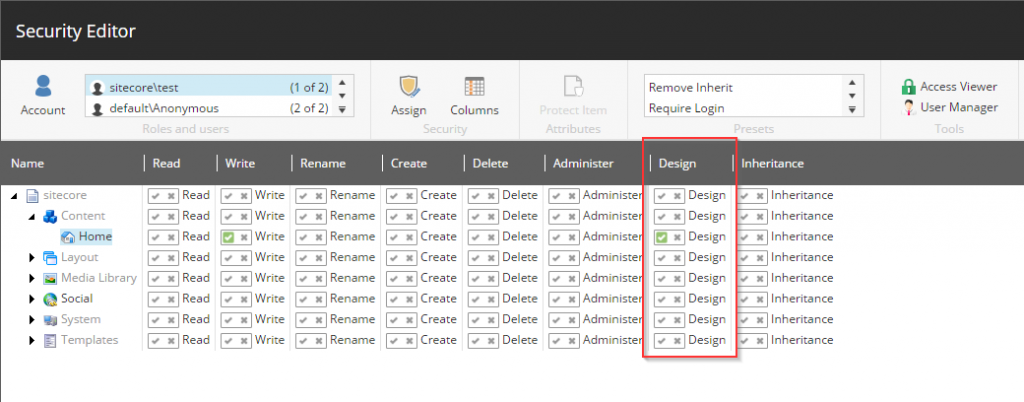
***NOTE**: You now have to explicitly allow access to designing for users/roles per item (supports inheritance of course).*