Query string parameter being URL encoded in Sitecore 8

Search for a command to run...

No comments yet. Be the first to comment.
Polly is great library for easily configuring different kinds of policies around code execution, be it retry, circuit breaker, caching or lots of other things. It's probably most often used around HTTP requests. If you haven't heard about it you defi...

This is part 2 of my series on unit testing in .NET (C#) and will be about my conventions regarding naming unit tests, how to structure them and which parts to test. And lastly I will help you increase readability of assertions and potential error me...

I feel like unit testing is very important and very beneficial in a lot of ways. It helps with not breaking existing functionality and thereby also making you more confident in changing code without fear of breaking important stuff. Often it also mak...

I've been working with Swagger through NSwag a lot recently and also needed to get it to work when hidden behind a reverse proxy - i.e. another service forwarding a request to the service exposing the Swagger UI. Some of the issues I've had along the...

The other day I was writing a unit test to verify what was supposed to happen when a Task would throw an exception when awaited. It wasn't as straight forward as I first assumed, but I quickly found this Stack Overflow post that helped me: https://st...

There currently is a bug in the latest version of Sitecore ranging from around version 7.2 to 8.0 Update-4 (rev. 150621) with regards to the query string parameter on internal links using a link field.
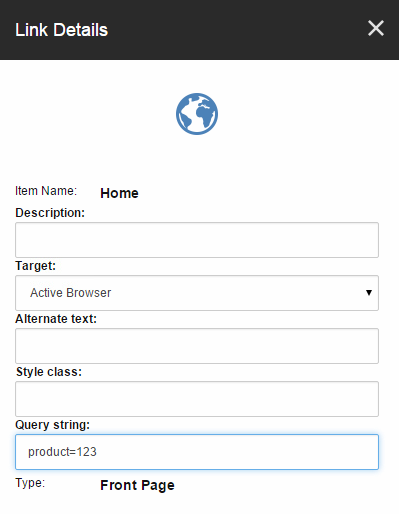
If you have chosen an item and entered something into the query string field and then try to retrieve the URL from code, you will not get the wanted result.
var linkField = (LinkField) Sitecore.Context.Item.Fields["Link"];
linkField.GetFriendlyUrl(); // http://yoursite.com/?product%3D123
When you save the link Sitecore will actually URL encode the query string value which in this case replaces = with %3D and it no longer works as expected. You can see this by looking at the raw value of the field.

The simple workaround is to just edit the raw value yourself to the correct value. However, it is a bit annoying and your editors may not be so technically inclined. If you contact Sitecore Support, though, they will be able to provide you with a fix which consists of a DLL and a minor change in the core database.
I’m told the bug was fixed in Sitecore 7.1 Update-1 (rev. 140130) but has not yet been implemented in Sitecore 8 for some reason but hopefully they will do that soon.